Prompt engineering became popular because it was the first part of AI work that felt accessible. You could open ChatGPT, type a better instruction, and get a noticeably better answer without learning infrastructure, deployment, or tests. Just you, the model, and a slightly more careful request.
Clear instructions still beat vague ones. The phrase starts to feel too small, though, once AI moves from answering questions to doing work.
In 2025, SaaStr founder Jason Lemkin said Replit’s AI coding agent deleted production data during development and, according to Lemkin, ignored a code freeze while doing it. Replit later said it had changed its systems so development databases could no longer access production data. The story is dramatic, but the lesson is ordinary. Once an AI can touch a real system, a bad answer can become a bad action in a place where the action counts.
You can tell an AI to be careful. If it can still reach the production database, send the email, approve the refund, or change the record, you also have to care about the room you put it in.
That room is the harness: the working layer between the model and the world. It decides what the AI can see, which tools it can use, what it is allowed to change, what gets checked, what gets logged, and when a person has to approve the next step. Birgitta Böckeler calls the work of building those controls harness engineering.
A policy or team habit does not become part of the harness merely by existing. The runtime has to use it as a rule, permission, tool, check, log, memory, or approval gate. Otherwise it is advice sitting nearby.
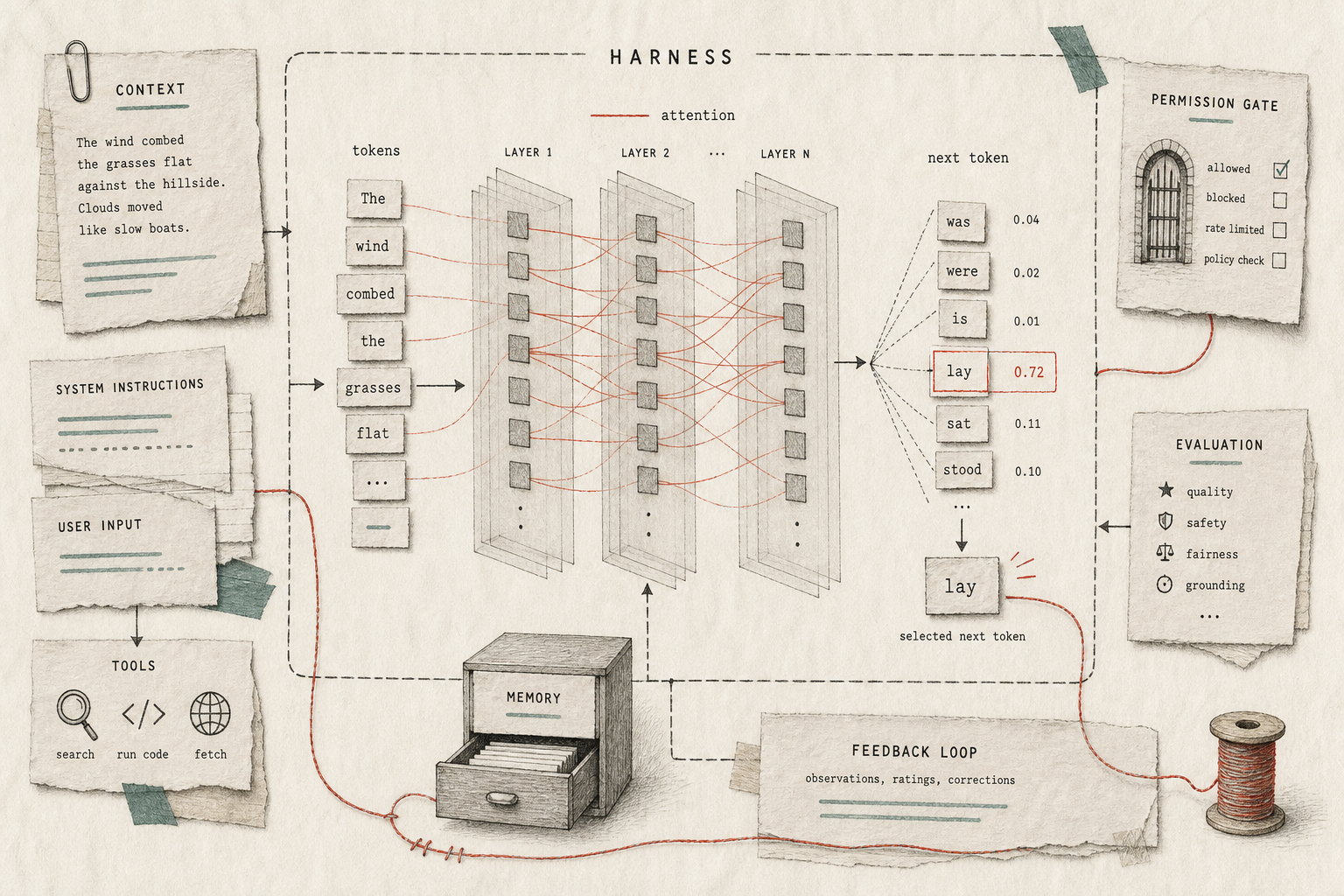
Figure 1. A useful AI product wraps context, tools, permissions, memory, evaluation, and feedback around the model.
The instruction is not the system
Imagine asking a new assistant to help with customer data. You could say, “Be careful.” I would still rather limit the assistant to the files it needs, block sensitive exports, log what it opened, and require approval before anything leaves the company.
Email makes the distinction even clearer. An assistant that can draft but cannot send does not need to remember a warning every time it works. The button is unavailable.
Research has the same problem. “Use reliable sources” leaves the difficult part inside the model’s judgment. Limiting the available sources, requiring links for factual claims, and flagging unsupported claims gives the instruction something to answer to.
This becomes important when a chatbot turns into an agent. The word “agent” gets stretched over nearly every AI feature, but the useful distinction is whether the system can act. Searching a document, editing a file, creating a calendar event, and pulling data from another service are all actions. So are deleting a file, making a purchase, changing a record, and touching production.
The model still matters. A capable model behind a careless interface can simply do the wrong work faster.
A harness is usually boring
A harness does not have to be a giant platform. It can be a permission setting, an approval step, a project file, a checklist, or a tool you deliberately did not connect.
The boundary test
Guidance tells the model what to do. A harness also changes what it can see, do, remember, check, or escalate.
A Custom GPT is a light version: instructions, knowledge files, capabilities, and sometimes actions connected to outside systems. A ChatGPT Project groups chats, reference files, and custom instructions around one piece of work. A Claude Project does something similar with project instructions and knowledge.
These products do not become industrial agent systems because somebody uploaded a PDF. They do show the basic move: narrow the context and decide which capabilities are available.
Automation tools make the control easier to see. Zapier’s Human in the Loop can pause a workflow for review. n8n can require approval before an agent executes selected tools. The workflow stops whether or not the model remembers to be cautious.
Coding agents expose more of the machinery because they operate inside real development environments. Claude Code has tool permissions, hooks, subagents, skills, and MCP connections. GitHub’s Copilot coding agent works in its own environment, changes a branch, and can open a pull request instead of editing production directly. LangGraph interrupts pause execution until external input arrives. HumanLayer is built around putting approval and oversight around tool calls.
There is rarely one grand product called “the harness.” What you get is a bundle of smaller decisions:
| Harness piece | Real-world control |
|---|---|
| Context | project files, approved sources, uploaded reference docs |
| Tools | search, calendar lookup, email draft, file edit, database lookup |
| Permissions | read-only access, draft-only email, no delete, no deploy |
| State | project notes, task history, saved handoff, checkpoint |
| Checks | citations, tests, review checklist, evaluator, second pass |
| Escalation | approval before send, refund limit, human review queue |
For a writing assistant, a style guide is only guidance until the system loads it before drafting, checks source-dependent claims, and blocks publication until somebody approves the result. For an email assistant, draft-only access is stronger than a paragraph asking the model not to send. Reading a calendar and moving a meeting should not share the same permission merely because they use the same API.
The practical question is simple: what should sit between this AI and the thing it is about to touch?
Guides, sensors, and added surface area
Böckeler splits a harness into guides and sensors. Guides help before the model acts: instructions, examples, templates, policies, source documents, style guides, and task descriptions. Sensors inspect what happened afterwards: tests, reviewers, logs, checklists, approvals, citations, and comparison steps.
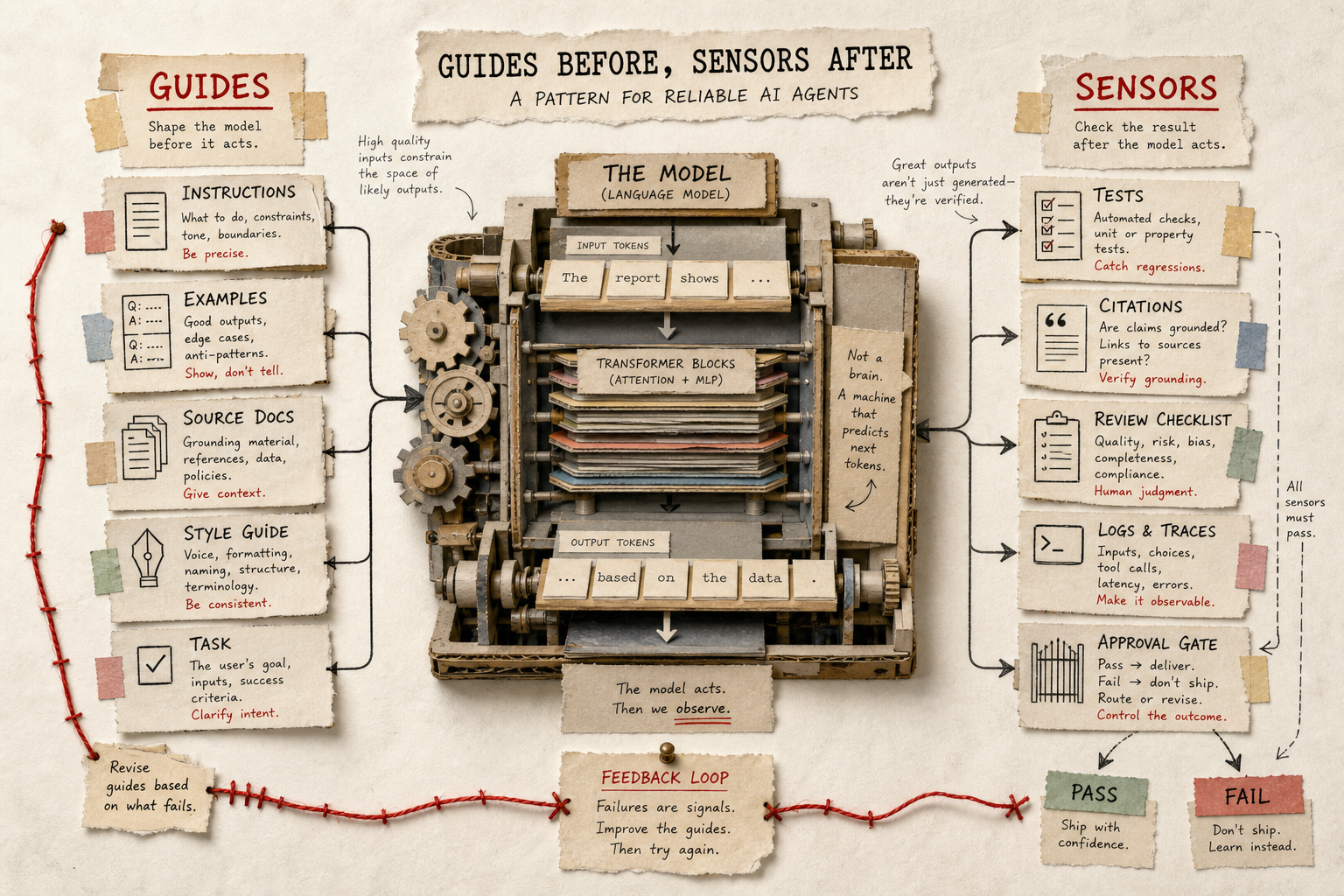
Figure 2. Guides improve an attempt before action. Sensors make the result inspectable afterwards.
Prompt engineering is naturally guide-heavy. It concentrates on what to tell the model upfront. That helps until the model misunderstands the instruction, loses it inside a long context, or produces work that sounds convincing but fails the real check.
“Check your work” is weak when there is nothing outside the model to check against. A source comparison, test, reviewer, or approval step gives it a reference point. AgentBench evaluated models across eight interactive environments and identified long-term reasoning, decision-making, and instruction following as recurring obstacles. Fluency is useful, but it does not prove that the work survived contact with the system around it.
Adding more guidance is not automatically safer. Chroma’s Context Rot work found that performance can degrade as context grows, even on controlled tasks. The earlier Lost in the Middle paper found that models often performed better when relevant information appeared near the beginning or end of a long context than when it was buried in the middle.
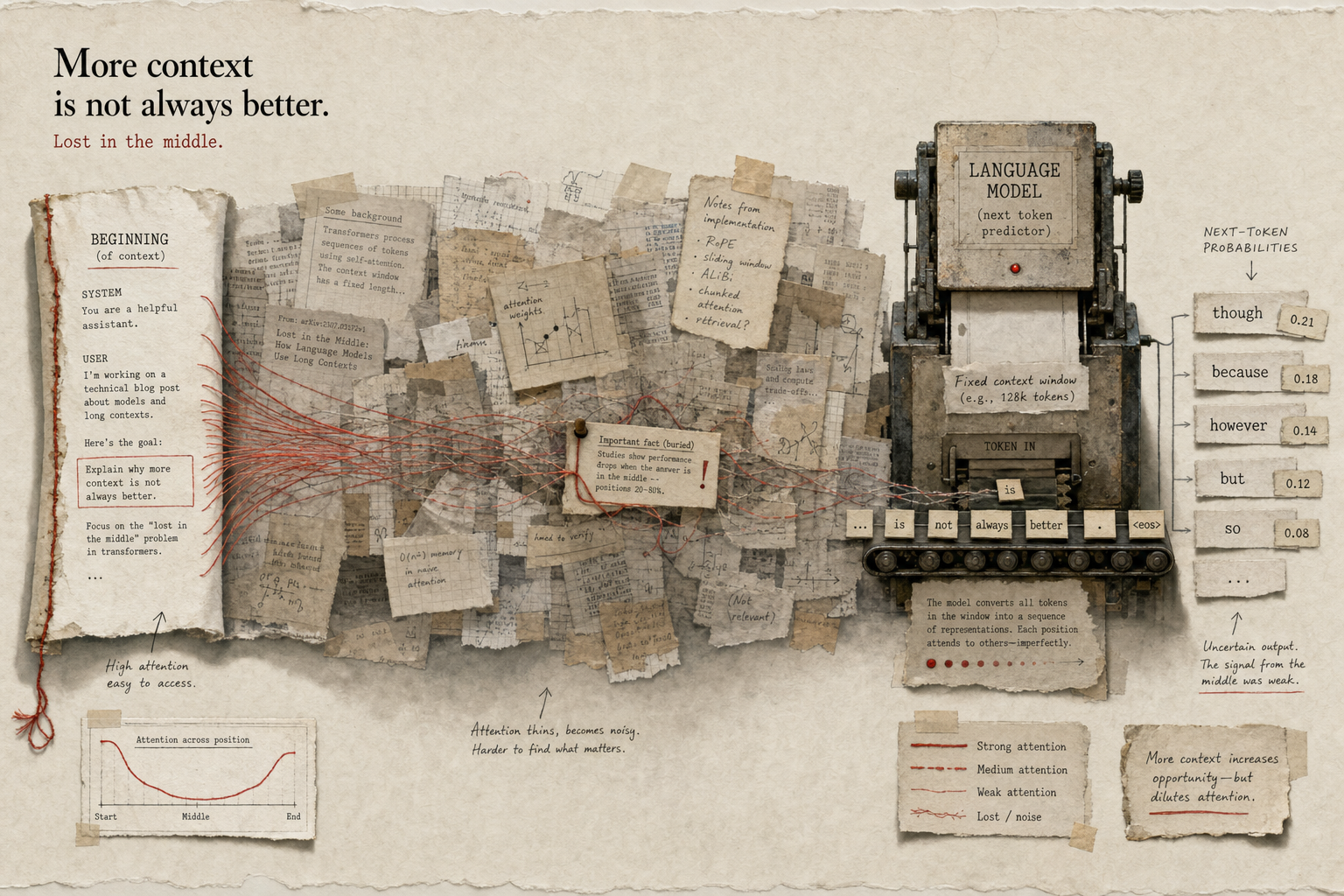
Figure 3. A long context window can hold more information without making every part equally easy to retrieve.
An ETH Zurich preprint evaluating AGENTS.md files reported increased cost and mixed performance benefits from repository-level instructions. Sometimes one missing sentence really is the bug. A manual that tries to anticipate every possible task can create a second job for the agent: interpret the encyclopedia before doing the work.
Tools add another kind of surface area. Each one arrives with a name, description, permission boundary, and failure mode. HumanLayer’s article on harness engineering for coding agents makes the practical version of this argument: more tools increase reach, but also give the model more choices to understand and use safely.
The SWE-agent researchers call the surrounding interface an “agent-computer interface.” Their framing matters because the interface is not neutral plumbing. Its design changes which work the agent can reliably perform.
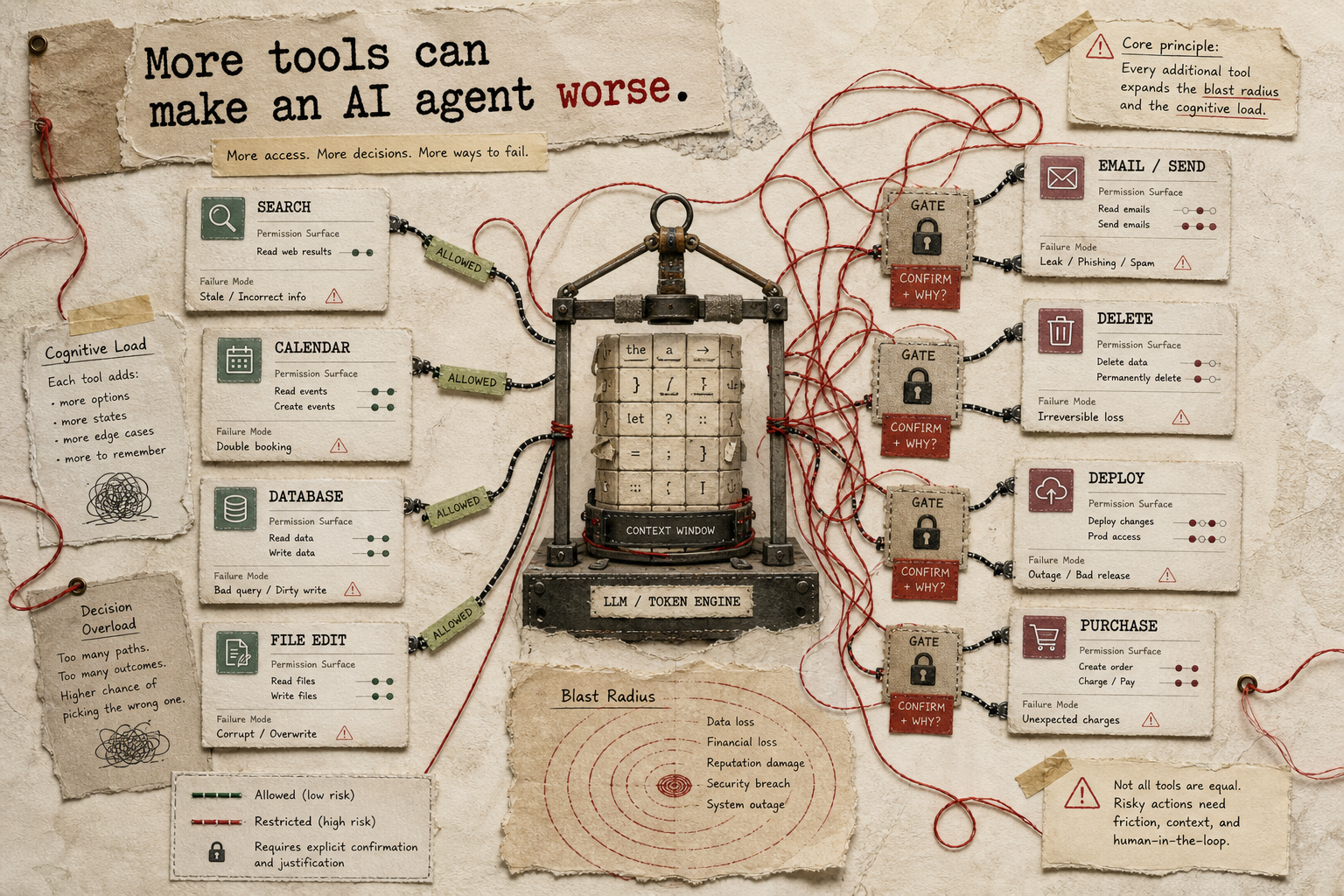
Figure 4. Every connected tool adds capability, a selection problem, and a permission boundary.
A read-only tool has a limited blast radius. Write, delete, deploy, send, purchase, and record-changing tools need stronger boundaries. Asking the model never to delete important data is much weaker than withholding delete access until the task actually requires it.
Let failures decide what gets added
Anthropic’s long-running app development harness separates planning, building, and evaluation while passing structured artifacts between the roles. The useful part is the separation of jobs. The system that created the work does not have to be its only judge.
A model can generate an answer and then produce a polished explanation for why the answer is good. Sometimes that second pass catches an issue. Sometimes it gives the mistake better lighting. Source comparison, tests, rubrics, and approval gates put another object in the loop that the explanation cannot simply talk around.
That does not justify designing a giant harness before the AI has failed in a meaningful way. Huge instruction files, every available tool, and elaborate approval flows can leave the agent spending half its time navigating precautions nobody has shown to be useful.
Start with the smallest setup that makes the work possible, then inspect the failures. Weak sources may justify an approved-source list or a citation check. Repeatedly messy drafts may justify a review rubric. A disappearing goal may need persistent state. A risky action happening too quickly needs an approval gate, not a sterner reminder.
Prompts remain part of this. Clear task framing, relevant examples, and concise context improve the first attempt. They should not be asked to carry permissions, state, evaluation, and recovery as well.
Before rewriting the prompt again, inspect the setup around it. Check what the AI can see, which actions are impossible, what state survives outside the conversation, how correctness is tested, what gets logged, and where a person has to decide.
Those controls are less exciting than a clever prompt. They are also the part that determines whether an AI demo can survive contact with real work.
Sources
Core framing:
- Birgitta Böckeler: Harness engineering for coding agent users
- Anthropic: Harness design for long-running application development
- HumanLayer: Skill Issue: Harness Engineering for Coding Agents
- OpenAI: Harness engineering: leveraging Codex in an agent-first world
Real examples and nearby products:
- OpenAI Help: Creating and editing GPTs
- OpenAI Developers: GPT Actions
- OpenAI Help: Projects in ChatGPT
- Anthropic Help: Claude project visibility, knowledge, and instructions
- Anthropic Docs: Claude Code hooks
- Anthropic Docs: Claude Code settings and permissions
- GitHub Docs: About GitHub Copilot coding agent
- GitHub Docs: Configure the Copilot coding agent environment
- Zapier Help: Human in the Loop
- n8n Docs: Human-in-the-loop for AI tool calls
- LangGraph Docs: Interrupts
- LangGraph Docs: Human-in-the-loop
Research and caution: